Know the plan. Know they got there.
Smart Connect puts your shared calendar, a group chat, calls and, if you choose, where everyone is, in one place. Built for families, and just as good for roommates, friends, teams and caregivers. No ads. We never sell your data.
For families and groups in our pilot. You’ll need your invitation to sign in.
- Free during the pilot
- No ads
- Android app
Who it’s for
Built for families. Works for any close group.
Anyone who shares plans and wants to know everyone got there can use Smart Connect the same way: one shared calendar, one chat, calls, and location that each person controls.
-
Families
School runs, practices, birthdays and “did you get home?”
-
Roommates
Who’s home, shared chores and bills on one calendar, and one chat for the house.
-
Friends and travel groups
Meet-ups and trips, and seeing that everyone made it back.
-
Teams and clubs
Game days, practice changes and rides, without a group text nobody can find.
-
Caregivers
Appointments, check-ins and a help button for the people looking after someone.
Calendar
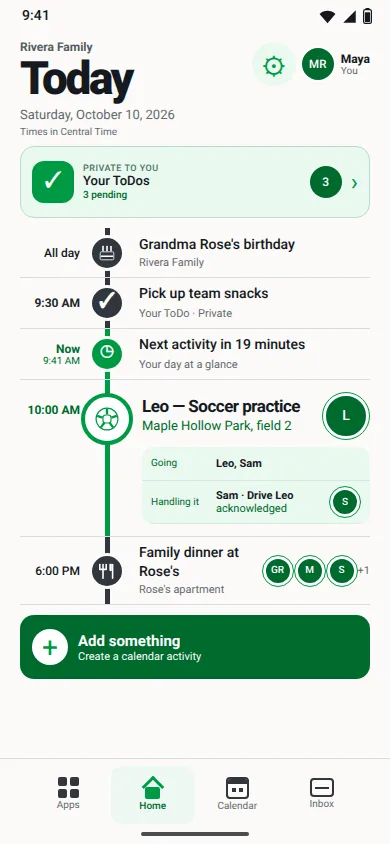
One plan everyone can see.
Add practices, appointments and birthdays once, and everyone has them. It works without a signal and catches up when you’re back online.
- See who’s going and who’s handling it.
- Birthdays repeat every year, with a reminder.
- Your private ToDos show up on Today, for your eyes only.
Talk
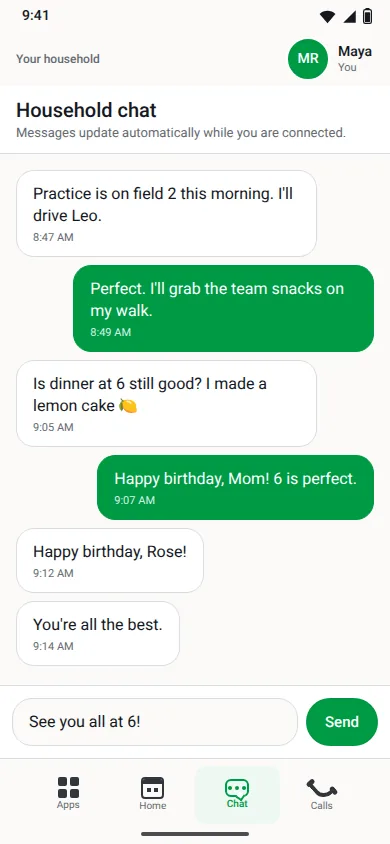
A group chat that isn’t buried in your texts.
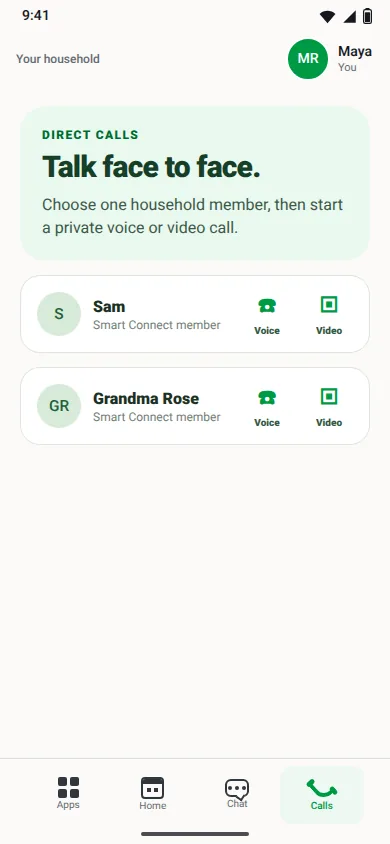
One shared conversation for plans and quick questions. When typing isn’t enough, start a voice or video call with anyone in the group.
- One group chat, and everyone sees the same thing.
- Private one-to-one voice and video calls, right in the app.
Location Android
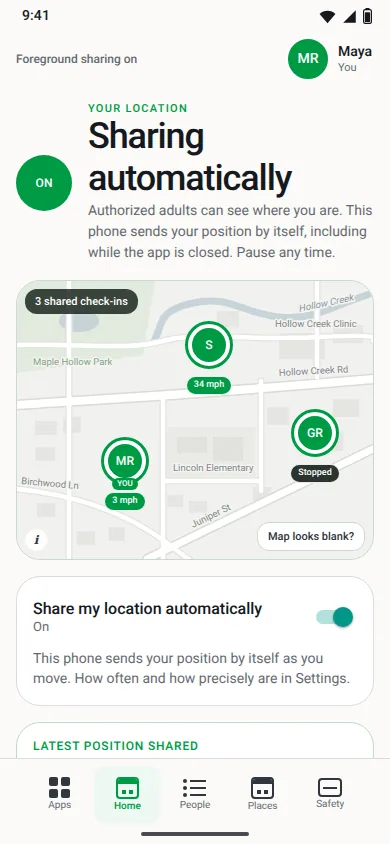
See who’s where, and how recent it is.
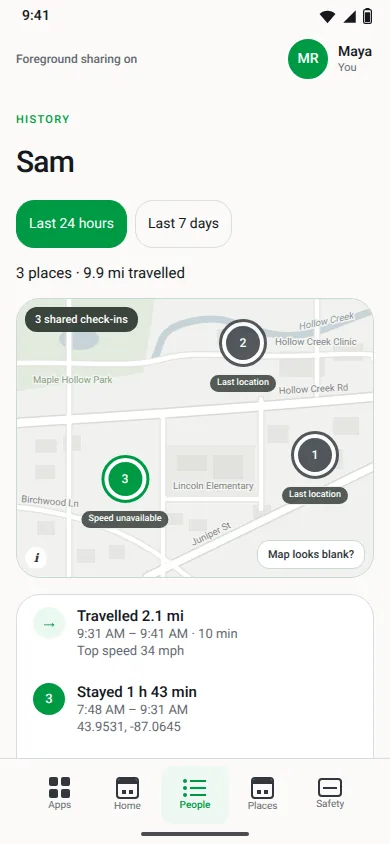
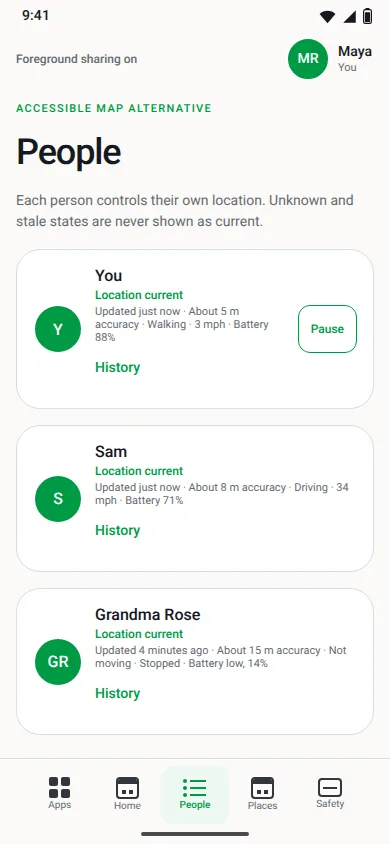
Each adult can share their location automatically or check in once. Every position shows how old it is and how much battery the phone has left, so “why isn’t she answering?” often answers itself.
- A stale position is labeled stale, never shown as current.
- Tap History to see where someone has been, for as long as they chose to keep it.
- A plain People list shows the same thing without a map.
Location & Safety features are on Android today. iPhones in the pilot run an earlier version that doesn’t have them yet.
Places Android
“Sam arrived at Work.” No text needed.
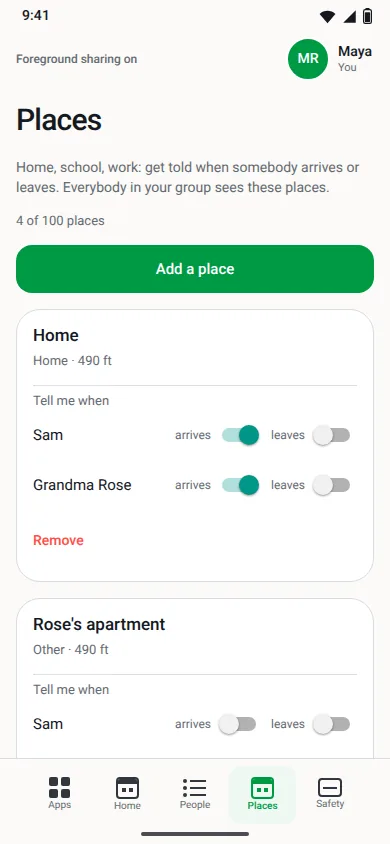
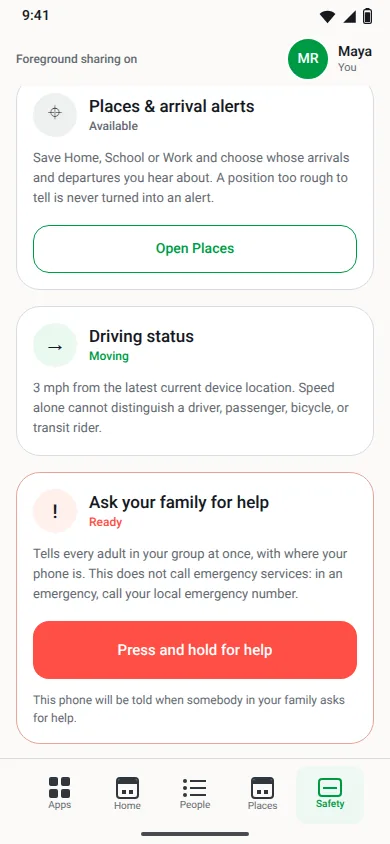
Save the places that matter and choose whose arrivals and departures you hear about. A rough position is never turned into an alert, so nobody flickers in and out at the edge of the parking lot.
- Home, school, work: name it and center it where you are.
- Arrives and leaves are separate switches, person by person.
Help Android
Ask your people for help with one button.
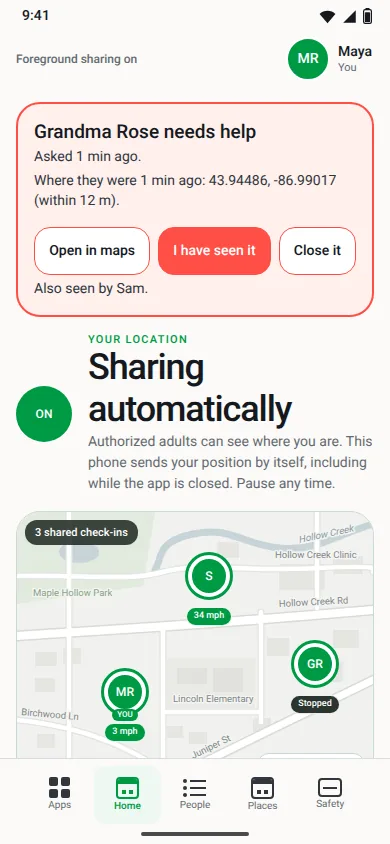
Press and hold, and every other adult in your family or group is told at once, with where your phone is. You get a few seconds to cancel.
This messages your family or group. It does not call emergency services, so in an emergency, call your local emergency number.
- See who was notified and who has seen it.
- The position sent with the alert is erased when the alert closes.
You’re in control Android
Sharing starts off, and only you can turn it on.
Pause any time. Choose whether your history is kept, and for how long: not at all, a day, a week, or 30 days.
- Nobody can turn it on for somebody else.
- While it’s on, your phone shows a notification, so you always know.
- When you share, the adults in your group can see you.
Also in the app
Personal ToDo
A private list only you can see, even inside your family group. Scheduled items show up on Today.
Alarms
Alarms on your own phone: one-time, weekdays, monthly or your own pattern.
Recipes & Pantry
Your recipes and what’s in the pantry, plus “What can I make now?” Scan a barcode to add food.
Our promises
Your information is yours. Full stop.
-
We never sell, broker or share your data.
Not to advertisers, not “anonymized”, not ever. There are no ads in Smart Connect.
-
Location is yours to switch on and off.
It starts off. Nobody can turn it on for you, and you can pause it any time. Your phone shows when it’s sharing.
-
Encrypted with your group’s own key.
Positions and saved places are stored encrypted under a key that belongs to your family or group alone.
-
Kept only as long as you choose.
Your history lasts as long as you pick: none, 24 hours, 7 days or 30 days. A help alert’s location is erased as soon as the alert is closed. (The help button messages your family or group; it is not an emergency service.)
No dark patterns. No tricks to keep you sharing.
Not yet
Straight answers about what’s not here yet.
- Crash detection and driving reports aren’t built yet.
- The help button messages your family or group only. It doesn’t contact emergency services.
- Location sharing is for adults. Kids can’t have their own accounts yet.
- The Location & Safety features aren’t in the iPhone version yet.
- There’s no App Store or Google Play listing yet. The pilot installs from our site.
FAQ
Questions families ask.
Is Smart Connect an emergency service?
No. The help button tells the other adults in your family or group, with where your phone is. It does not contact 911 or any emergency or roadside service. In an emergency, call your local emergency number first.
Do you sell my data?
No. Vitelligence never sells, brokers or shares customer data. That includes advertisers, data brokers, and “anonymized” or “aggregated” versions. Smart Connect has no ads.
Who can see where I am?
Nobody, until you turn sharing on from your own phone. Once it’s on, the adults in your group can see your location. You can pause it any time, and nobody else can turn it back on for you.
How long is my location history kept?
You choose: not at all, 24 hours (the default), 7 days or 30 days. If you choose “not at all”, your family sees only where you are now.
Is it only for families?
No. It was built with families in mind, and it works the same way for any close group: roommates, friends, a team or club, or the people caring for someone. Everyone in the group shares one calendar and one chat, and each person decides for themselves whether to share where they are.
Can my kids use it?
Kids can be on the family calendar, but location sharing is for adults today and kids can’t have their own accounts yet. We’d rather tell you that than overpromise.
Will it drain my battery?
Automatic sharing uses more battery, and the app tells you so before you turn it on. It uses a balanced accuracy setting by default and sends nothing new while you’re standing still. A one-time check-in costs almost nothing.
How do I get it, and what does it cost?
Smart Connect is in a private family pilot. Invited families and groups install the Android app from our download page and sign in with their invitation. It’s free for pilot families and groups. iPhones in the pilot are set up one by one, so ask us.

Already invited? Get Smart Connect.
Install on Android and sign in with your invitation. Not in the pilot yet? We’d love to hear from your family or group.